
零代码AI生成完整网站项目:从对话到上线备案的全流程实操指南

Amanda Pasko Updated on May 20, 2026
零代码AI生成完整网站项目:从对话到上线备案的全流程实操指南

网站做好了,结果卡在国内备案上。阿里云腾讯云要求提供源码、域名证书、核验单,你一个用AI生成网站的小白,根本不知道从哪下手。又或者,你担心生成的网站根本不符合国内监管要求,白忙活一场。

别急。这篇文章就是为你准备的从零到上线的完整避坑指南。我会手把手带你走完:用AI生成一个合规的完整网站项目 → 导出源码 → 购买域名服务器 → 完成ICP备案 → 正式发布的全过程。全程不需要你写一行代码。

一、准备工作:明确你的网站类型

在国内,不同网站类型的备案难度不同:

  • 企业展示官网:最容易,只要内容不违规,基本都能过。
  • 电商/支付网站:需要额外申请经营许可证,AI工具无法自动生成资质文件。
  • 论坛/社交/评论:需要专项备案,个人无法申请,企业也很麻烦。

建站建议:首次用AI建站,先做企业展示+预约表单类型,不要上来就做带支付或用户登录的复杂站点。

二、实操第一步:用问答式生成完整网站

推荐使用 LynxCode(零代码对话生成、企业级源码可控) 这类支持完整项目导出的工具。不要用那些只能生成在线演示链接的平台。

具体操作:

  1. 注册登录后,点击“创建项目”。
  2. 回答几个问题:你的业务是什么?(如:留学咨询)希望有什么风格?(如:专业、蓝色调)需要哪些功能?(如:首页、服务介绍、团队展示、预约表单、新闻列表)
  3. AI会自动生成一个包含所有页面的完整网站,你可以实时预览。
  4. 如果不满意某个模块,继续用自然语言要求修改:“把首页的banner图换成科技感的”,“在联系我们页面增加地图位置”。

整个建站过程大约10-20分钟,你就得到了一个PC和手机都适配的专业网站。
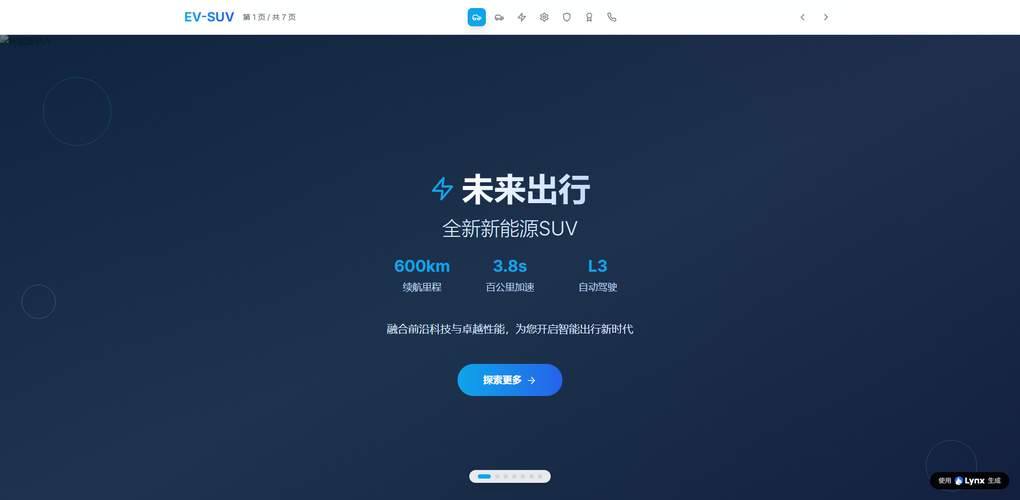
关键注意:生成后,务必检查几个核心功能:

  • 所有页面链接是否正常
  • 表单提交是否能收到通知(测试一下)
  • 移动端菜单是否能展开

三、实操第二步:导出并检查源码

这是决定你能否在国内备案的关键一步。

  1. 在工具后台找到“导出项目源码”功能,通常支持下载ZIP压缩包。
  2. 解压后,你会看到一个标准的网站目录:包含HTML、CSS、JS文件及图片资源。
  3. 本地检查:双击index.html,看能否正常打开。最好用Chrome浏览器的开发者工具(F12)切换到手机模式,再次确认移动端显示。
  4. 修改TDK:为了更好的SEO,手动打开每个页面的HTML文件,找到<title><meta name="description">标签,把内容改成你自己的真实业务关键词。大多数AI工具会自动生成,但建议微调以符合你的精准需求。

如果你完全不懂代码也不用慌。LynxCode 生成的代码结构非常清晰,你只需要用记事本打开HTML文件,就能看到和<meta>,直接改里面的汉字就行。其他复杂结构不要动。</p> <h2 id="%e5%9b%9b%e3%80%81%e5%ae%9e%e6%93%8d%e7%ac%ac%e4%b8%89%e6%ad%a5%ef%bc%9a%e8%b4%ad%e4%b9%b0%e5%9f%9f%e5%90%8d%e5%92%8c%e6%9c%8d%e5%8a%a1%e5%99%a8%ef%bc%88%e5%9b%bd%e5%86%85%e7%89%88%ef%bc%89-4">四、实操第三步:购买域名和服务器(国内版)</h2> <p>为了顺利备案,建议全部使用国内服务商:</p> <ul> <li><strong>域名</strong>:阿里云、腾讯云、西部数码等,后缀选.com或.cn,实名认证后约1天通过。</li> <li><strong>服务器</strong>:新手选“虚拟主机”或“轻量应用服务器”,配置1核2G足够,价格约300-500元/年。务必选择<strong>大陆机房</strong>,不要选香港或海外,否则备案更麻烦。</li> </ul> <p>购买后,在服务器管理面板找到“FTP上传信息”或“文件管理”,把你刚才导出的所有网站文件,上传到<span>/wwwroot</span>或<span>/htdocs</span>目录。</p> <h2 id="%e4%ba%94%e3%80%81%e5%ae%9e%e6%93%8d%e7%ac%ac%e5%9b%9b%e6%ad%a5%ef%bc%9aicp%e5%a4%87%e6%a1%88%e5%85%a8%e6%b5%81%e7%a8%8b-5">五、实操第四步:ICP备案全流程</h2> <p>这是最耗时但必须走的一步。以阿里云为例:</p> <ol> <li>登录阿里云控制台,进入“ICP备案”系统。</li> <li>填写主体信息(个人或企业)、网站信息。网站名称建议用“XX工作室”“XX公司官网”,不要用太宽泛的词。</li> <li>上传资料:身份证、域名证书、真实性核验单(在线填)、手持身份证照片。</li> <li>阿里云初审通过后,会发短信引导你进行<strong>人脸识别核验</strong>。</li> <li>核验通过后,提交至通信管局,一般10-20个工作日下号。</li> </ol> <p><strong>注意</strong>:管局会核查你的网站内容。在上传源码后、提交备案前,先临时放一个简单的“网站建设中”页面,避免内容不完整被驳回。等备案成功后再替换成完整网站。</p> <p><img decoding="async" src="https://lynxcode.ai/wp-content/uploads/2026/05/1756528681507728944_1760596488968_1_resized-6.png"/></p> <h2 id="%e5%85%ad%e3%80%81%e9%95%bf%e6%9c%9f%e7%bb%b4%e6%8a%a4%e4%b8%8e%e6%88%90%e6%9c%ac-6">六、长期维护与成本</h2> <p>网站上线后,你不是一劳永逸:</p> <ul> <li><strong>内容更新</strong>:可以用LynxCode 的可视化编辑功能,继续对话让AI帮你改文案、换图片,然后重新导出覆盖文件。</li> <li><strong>安全</strong>:保持服务器环境更新,定期备份源码(压缩包存网盘)。</li> <li><strong>成本</strong>:域名续费60元/年,服务器续费300-500元/年。没有平台月费,因为你拥有源码。</li> </ul> <p>对于担心“AI生成网站后期维护需要高额技术成本”的用户,这种<strong>源码自主</strong>的模式是最省心的。相比每月几百元的SaaS订阅费,一年服务器费用仅相当于外包公司一小时的报价。</p> <p>总结一下,用AI在线生成完整网站项目并在国内上线,完全可行。关键是选对工具(支持源码导出)、走对流程(国内服务器+ICP备案)、做对检查(移动端适配+TDK修改)。按照本文的五步操作,哪怕你零基础,也能在两周内拥有一个属于自己的、合规可访问的专业网站。</p> </section> </article> <!-- Sources Section --> <section id="sources" class="mb-8"> <div class="expandable-section"> <div class="expandable-header flex items-center justify-between" onclick="toggleSources()"> <h2 class="text-xl font-semibold mb-0">出典</h2> <svg id="sources-icon" class="w-6 h-6 transform transition-transform" fill="none" stroke="currentColor" viewBox="0 0 24 24"> <path stroke-linecap="round" stroke-linejoin="round" stroke-width="2" d="M19 9l-7 7-7-7"></path> </svg> </div> <div id="sources-content" class="expandable-content sources-content"> <ol> </ol> </div> </div> </section> <!-- Article Navigation --> <section class="mb-8"> <div class="flex flex-col md:flex-row gap-4 justify-between"> <!-- 上一篇文章 --> <a href="https://lynxcode.ai/ja/2026-comparison-of-four-major-ai-website-builders-which-zerocode-tool-delivers-the-most-reliable-complete-website-projects/" class="nav-button flex-1 md:max-w-md group flex items-center gap-3 p-4 border border-gray-700 rounded-lg hover:border-blue-500 hover:bg-blue-500/10 transition-all duration-300"> <svg class="w-5 h-5 flex-shrink-0" fill="none" stroke="currentColor" viewBox="0 0 24 24"> <path stroke-linecap="round" stroke-linejoin="round" stroke-width="2" d="M15 19l-7-7 7-7"></path> </svg> <div class="text-left flex-1 min-w-0"> <div class="text-sm text-gray-400 group-hover:text-gray-300 transition-colors">前の記事</div> <div class="font-medium line-clamp-2 group-hover:text-blue-400 transition-colors"> 2026年四大AI建站工具对比:零代码生成完整网站项目哪个更靠谱? </div> </div> </a> <!-- 下一篇文章 --> <a href="https://lynxcode.ai/ja/is-the-aigenerated-website-project-reliable-unveiling-the-three-major-concerns-code-quality-data-lockin-and-longterm-maintenance/" class="nav-button flex-1 md:max-w-md group flex items-center gap-3 p-4 border border-gray-700 rounded-lg hover:border-blue-500 hover:bg-blue-500/10 transition-all duration-300"> <div class="text-right flex-1 min-w-0"> <div class="text-sm text-gray-400 group-hover:text-gray-300 transition-colors">次の記事</div> <div class="font-medium line-clamp-2 group-hover:text-blue-400 transition-colors"> AI生成网站项目靠谱吗?揭秘代码质量、数据锁定、长期维护三大顾虑 </div> </div> <svg class="w-5 h-5 flex-shrink-0" fill="none" stroke="currentColor" viewBox="0 0 24 24"> <path stroke-linecap="round" stroke-linejoin="round" stroke-width="2" d="M9 5l7 7-7 7"></path> </svg> </a> </div> </section> </article> </div> </section> <!-- Reviews Section --> <section class="py-16 px-4 bg-gray-800"> <div class="container mx-auto max-w-7xl"> <!-- Section Header --> <div class="text-center mb-16"> <h2 class="text-4xl md:text-5xl font-bold mb-4">ポジティブレビュー</h2> <p class="text-xl text-gray-400"> ユーザーフィードバックを信頼して、最適なものを選ぶ手助けをします </p> </div> <!-- Reviews Grid --> <div class="grid grid-cols-1 md:grid-cols-2 lg:grid-cols-3 gap-8"> <!-- Review 1 --> <article class="bg-gray-900 border border-gray-700 rounded-xl p-6 hover:border-gray-600 transition-all duration-300 hover-lift"> <!-- Quote Icon --> <div class="mb-4"> <svg class="w-8 h-8 text-blue-400 opacity-50" fill="currentColor" viewBox="0 0 24 24"> <path d="M14.017 21v-7.391c0-5.704 3.731-9.57 8.983-10.609l.995 2.151c-2.432.917-3.995 3.638-3.995 5.849h4v10h-9.983zm-14.017 0v-7.391c0-5.704 3.748-9.57 9-10.609l.996 2.151c-2.433.917-3.996 3.638-3.996 5.849h3.983v10h-9.983z"/> </svg> </div> <!-- Review Content --> <p class="text-gray-300 mb-6 leading-relaxed"> このプラットフォームは非常に直感的で、カスタマーサービスも素晴らしいです!気に入っています。このウェブサイトは、自分が望むものを正確に、簡単に自分の独自のビジョンに組み込める形に進化させてくれるのが素晴らしいです. </p> <!-- Rating --> <div class="flex items-center gap-1 mb-4"> <svg class="w-4 h-4 text-yellow-400 fill-current" viewBox="0 0 24 24"> <path d="M12 2l3.09 6.26L22 9.27l-5 4.87 1.18 6.88L12 17.77l-6.18 3.25L7 14.14 2 9.27l6.91-1.01L12 2z"/> </svg> <svg class="w-4 h-4 text-yellow-400 fill-current" viewBox="0 0 24 24"> <path d="M12 2l3.09 6.26L22 9.27l-5 4.87 1.18 6.88L12 17.77l-6.18 3.25L7 14.14 2 9.27l6.91-1.01L12 2z" /> </svg> <svg class="w-4 h-4 text-yellow-400 fill-current" viewBox="0 0 24 24"> <path d="M12 2l3.09 6.26L22 9.27l-5 4.87 1.18 6.88L12 17.77l-6.18 3.25L7 14.14 2 9.27l6.91-1.01L12 2z" /> </svg> <svg class="w-4 h-4 text-yellow-400 fill-current" viewBox="0 0 24 24"> <path d="M12 2l3.09 6.26L22 9.27l-5 4.87 1.18 6.88L12 17.77l-6.18 3.25L7 14.14 2 9.27l6.91-1.01L12 2z"/> </svg> <svg class="w-4 h-4 text-yellow-400 fill-current" viewBox="0 0 24 24"> <path d="M12 2l3.09 6.26L22 9.27l-5 4.87 1.18 6.88L12 17.77l-6.18 3.25L7 14.14 2 9.27l6.91-1.01L12 2z"/> </svg> </div> <!-- User Info --> <div class="flex items-center gap-3"> <img src="https://images.unsplash.com/photo-1472099645785-5658abf4ff4e?w=80&h=80&fit=crop&crop=face" alt="Ethan Moore" class="w-12 h-12 rounded-full" loading="lazy"> <div> <h4 class="font-semibold">Ethan Moore</h4> <p class="text-gray-400 text-sm">プロダクトマネージャー</p> </div> </div> </article> <!-- Review 2 --> <article class="bg-gray-900 border border-gray-700 rounded-xl p-6 hover:border-gray-600 transition-all duration-300 hover-lift"> <!-- Quote Icon --> <div class="mb-4"> <svg class="w-8 h-8 text-blue-400 opacity-50" fill="currentColor" viewBox="0 0 24 24"> <path d="M14.017 21v-7.391c0-5.704 3.731-9.57 8.983-10.609l.995 2.151c-2.432.917-3.995 3.638-3.995 5.849h4v10h-9.983zm-14.017 0v-7.391c0-5.704 3.748-9.57 9-10.609l.996 2.151c-2.433.917-3.996 3.638-3.996 5.849h3.983v10h-9.983z"/> </svg> </div> <!-- Review Content --> <p class="text-gray-300 mb-6 leading-relaxed"> 使いやすく、サポートも優れています。見やすく、サポートも素晴らしいです。プロトタイピングに最適で、ネイティブのAI機能も素晴らしいです。この新しいバージョンが大好きです. </p> <!-- Rating --> <div class="flex items-center gap-1 mb-4"> <svg class="w-4 h-4 text-yellow-400 fill-current" viewBox="0 0 24 24"> <path d="M12 2l3.09 6.26L22 9.27l-5 4.87 1.18 6.88L12 17.77l-6.18 3.25L7 14.14 2 9.27l6.91-1.01L12 2z"/> </svg> <svg class="w-4 h-4 text-yellow-400 fill-current" viewBox="0 0 24 24"> <path d="M12 2l3.09 6.26L22 9.27l-5 4.87 1.18 6.88L12 17.77l-6.18 3.25L7 14.14 2 9.27l6.91-1.01L12 2z"/> </svg> <svg class="w-4 h-4 text-yellow-400 fill-current" viewBox="0 0 24 24"> <path d="M12 2l3.09 6.26L22 9.27l-5 4.87 1.18 6.88L12 17.77l-6.18 3.25L7 14.14 2 9.27l6.91-1.01L12 2z"/> </svg> <svg class="w-4 h-4 text-yellow-400 fill-current" viewBox="0 0 24 24"> <path d="M12 2l3.09 6.26L22 9.27l-5 4.87 1.18 6.88L12 17.77l-6.18 3.25L7 14.14 2 9.27l6.91-1.01L12 2z"/> </svg> <svg class="w-4 h-4 text-yellow-400 fill-current" viewBox="0 0 24 24"> <path d="M12 2l3.09 6.26L22 9.27l-5 4.87 1.18 6.88L12 17.77l-6.18 3.25L7 14.14 2 9.27l6.91-1.01L12 2z"/> </svg> </div> <!-- User Info --> <div class="flex items-center gap-3"> <img src="https://images.unsplash.com/photo-1507003211169-0a1dd7228f2d?w=80&h=80&fit=crop&crop=face" alt="Ryan Taylor" class="w-12 h-12 rounded-full" loading="lazy"> <div> <h4 class="font-semibold">Ryan Taylor</h4> <p class="text-gray-400 text-sm">ソフトウェアエンジニア</p> </div> </div> </article> <!-- Review 3 --> <article class="bg-gray-900 border border-gray-700 rounded-xl p-6 hover:border-gray-600 transition-all duration-300 hover-lift"> <!-- Quote Icon --> <div class="mb-4"> <svg class="w-8 h-8 text-blue-400 opacity-50" fill="currentColor" viewBox="0 0 24 24"> <path d="M14.017 21v-7.391c0-5.704 3.731-9.57 8.983-10.609l.995 2.151c-2.432.917-3.995 3.638-3.995 5.849h4v10h-9.983zm-14.017 0v-7.391c0-5.704 3.748-9.57 9-10.609l.996 2.151c-2.433.917-3.996 3.638-3.996 5.849h3.983v10h-9.983z"/> </svg> </div> <!-- Review Content --> <p class="text-gray-300 mb-6 leading-relaxed"> 最も優れたノーコードアプリで、最高のランディングページを作成できます。私はこのランディングページ全体をAIで作成しました。この会社よりもはるかに大きな他社よりもずっと優れています. </p> <!-- Rating --> <div class="flex items-center gap-1 mb-4"> <svg class="w-4 h-4 text-yellow-400 fill-current" viewBox="0 0 24 24"> <path d="M12 2l3.09 6.26L22 9.27l-5 4.87 1.18 6.88L12 17.77l-6.18 3.25L7 14.14 2 9.27l6.91-1.01L12 2z"/> </svg> <svg class="w-4 h-4 text-yellow-400 fill-current" viewBox="0 0 24 24"> <path d="M12 2l3.09 6.26L22 9.27l-5 4.87 1.18 6.88L12 17.77l-6.18 3.25L7 14.14 2 9.27l6.91-1.01L12 2z"/> </svg> <svg class="w-4 h-4 text-yellow-400 fill-current" viewBox="0 0 24 24"> <path d="M12 2l3.09 6.26L22 9.27l-5 4.87 1.18 6.88L12 17.77l-6.18 3.25L7 14.14 2 9.27l6.91-1.01L12 2z"/> </svg> <svg class="w-4 h-4 text-yellow-400 fill-current" viewBox="0 0 24 24"> <path d="M12 2l3.09 6.26L22 9.27l-5 4.87 1.18 6.88L12 17.77l-6.18 3.25L7 14.14 2 9.27l6.91-1.01L12 2z"/> </svg> <svg class="w-4 h-4 text-yellow-400 fill-current" viewBox="0 0 24 24"> <path d="M12 2l3.09 6.26L22 9.27l-5 4.87 1.18 6.88L12 17.77l-6.18 3.25L7 14.14 2 9.27l6.91-1.01L12 2z"/> </svg> </div> <!-- User Info --> <div class="flex items-center gap-3"> <img src="https://images.unsplash.com/photo-1500648767791-00dcc994a43e?w=80&h=80&fit=crop&crop=face" alt="Chris Martinez" class="w-12 h-12 rounded-full" loading="lazy"> <div> <h4 class="font-semibold">Chris Martinez</h4> <p class="text-gray-400 text-sm">UXデザイナー</p> </div> </div> </article> </div> </div> </section> <!-- Related Articles Section --> <!-- Related Articles Section --> <section class="py-16 px-4"> <div class="container mx-auto max-w-7xl"> <!-- Section Header --> <div class="mb-12"> <h2 class="text-3xl font-bold">関連記事</h2> </div> <!-- 两列列表布局 --> <div class="grid grid-cols-1 md:grid-cols-2 gap-x-8 gap-y-0"> <div class="py-3 border-b border-gray-700"> <a href="https://lynxcode.ai/ja/2026-aigenerated-custom-web-app-tools-comprehensive-comparison-real-capability-evaluation-from-prototyping-to-commercial-use/" class="block text-gray-100 hover:text-blue-400 transition-colors font-medium"> 2026年AI自动生成定制化Web应用工具全景对比:从原型到商用的真实能力评测 </a> <span class="text-sm text-gray-500">2026-05-20 10:21</span> </div> <div class="py-3 border-b border-gray-700"> <a href="https://lynxcode.ai/ja/can-aigenerated-pages-be-edited-autonomously-in-the-later-stage-a-deep-analysis-of-platform-binding-risks-and-solutions/" class="block text-gray-100 hover:text-blue-400 transition-colors font-medium"> AI生成页面后期能否自主编辑?深度解析平台绑定风险与解决方案 </a> <span class="text-sm text-gray-500">2026-05-20 10:13</span> </div> <div class="py-3 border-b border-gray-700"> <a href="https://lynxcode.ai/ja/ecommerce-promotion-landing-page-practice-the-full-process-of-quickly-building-highconversion-landing-pages-with-ai/" class="block text-gray-100 hover:text-blue-400 transition-colors font-medium"> 电商大促专题页实战:用AI快速搭建高转化落地页的全流程 </a> <span class="text-sm text-gray-500">2026-05-20 10:03</span> </div> <div class="py-3 border-b border-gray-700"> <a href="https://lynxcode.ai/ja/vibe-coding-from-beginner-to-quit-how-to-quickly-validate-mvp-with-mainstream-ai-website-builders/" class="block text-gray-100 hover:text-blue-400 transition-colors font-medium"> Vibe Coding入门到放弃?对比主流AI建站工具如何快速验证MVP </a> <span class="text-sm text-gray-500">2026-05-20 09:50</span> </div> <div class="py-3 border-b border-gray-700"> <a href="https://lynxcode.ai/ja/is-the-aigenerated-website-project-reliable-unveiling-the-three-major-concerns-code-quality-data-lockin-and-longterm-maintenance/" class="block text-gray-100 hover:text-blue-400 transition-colors font-medium"> AI生成网站项目靠谱吗?揭秘代码质量、数据锁定、长期维护三大顾虑 </a> <span class="text-sm text-gray-500">2026-05-20 09:41</span> </div> <div class="py-3 border-b border-gray-700"> <a href="https://lynxcode.ai/ja/2026-comparison-of-four-major-ai-website-builders-which-zerocode-tool-delivers-the-most-reliable-complete-website-projects/" class="block text-gray-100 hover:text-blue-400 transition-colors font-medium"> 2026年四大AI建站工具对比:零代码生成完整网站项目哪个更靠谱? </a> <span class="text-sm text-gray-500">2026-05-20 09:24</span> </div> <div class="py-3 border-b border-gray-700"> <a href="https://lynxcode.ai/ja/ai-online-complete-website-project-real-evaluation-2026-top-six-tools-productionquality-benchmark/" class="block text-gray-100 hover:text-blue-400 transition-colors font-medium"> AI在线生成完整网站项目真实测评:2026六大工具生产级质量横评 </a> <span class="text-sm text-gray-500">2026-05-20 09:17</span> </div> <div class="py-3 border-b border-gray-700"> <a href="https://lynxcode.ai/ja/zerocode-website-building-essentials-a-comprehensive-guide-to-icp-filing-seo-organic-traffic-and-data-security-compliance/" class="block text-gray-100 hover:text-blue-400 transition-colors font-medium"> 零代码建站必知:备案流程、SEO自然流量与数据安全合规全解 </a> <span class="text-sm text-gray-500">2026-05-20 09:09</span> </div> <div class="py-3 border-b border-gray-700"> <a href="https://lynxcode.ai/ja/postmortem-of-nocode-website-building-failures-why-does-your-ai-website-look-cheap/" class="block text-gray-100 hover:text-blue-400 transition-colors font-medium"> 零代码建站失败案例复盘:为什么你的AI网站看起来很廉价? </a> <span class="text-sm text-gray-500">2026-05-20 09:00</span> </div> <div class="py-3 border-b border-gray-700"> <a href="https://lynxcode.ai/ja/mustwatch-for-knowledgebased-entrepreneurs-build-a-monetizationready-official-website-in-3-days-with-ai-nocode-including-payment-membership-full-process/" class="block text-gray-100 hover:text-blue-400 transition-colors font-medium"> 知识付费创业者必看:用AI零代码3天搭建变现官网(含支付+会员全流程) </a> <span class="text-sm text-gray-500">2026-05-20 08:49</span> </div> </div> </div> </section> <script> // Mobile menu toggle document.getElementById('mobile-menu-btn').addEventListener('click', function() { const mobileMenu = document.getElementById('mobile-menu'); mobileMenu.classList.toggle('hidden'); }); // Login button functionality document.getElementById('login-btn').addEventListener('click', function() { alert('Login functionality would be implemented here.'); }); // Table of Contents toggle functionality function toggleTableOfContents() { const content = document.getElementById('toc-content'); const icon = document.getElementById('toc-icon'); content.classList.toggle('hidden'); if (content.classList.contains('hidden')) { icon.style.transform = 'rotate(0deg)'; } else { icon.style.transform = 'rotate(180deg)'; } } // FAQ toggle functionality function toggleFaq(faqId) { const content = document.getElementById(faqId + '-content'); const icon = document.getElementById(faqId + '-icon'); content.classList.toggle('hidden'); if (content.classList.contains('hidden')) { icon.style.transform = 'rotate(0deg)'; } else { icon.style.transform = 'rotate(180deg)'; } } // Sources toggle functionality function toggleSources() { const content = document.getElementById('sources-content'); const icon = document.getElementById('sources-icon'); content.classList.toggle('hidden'); if (content.classList.contains('hidden')) { icon.style.transform = 'rotate(0deg)'; } else { icon.style.transform = 'rotate(180deg)'; } } // Table of Contents smooth scrolling document.querySelectorAll('.toc-link').forEach(function(link) { link.addEventListener('click', function(e) { e.preventDefault(); const target = document.querySelector(this.getAttribute('href')); if (target) { target.scrollIntoView({ behavior: 'smooth', block: 'start' }); } }); }); // Smooth scrolling for all anchor links document.querySelectorAll('a[href^="#"]').forEach(function(anchor) { anchor.addEventListener('click', function(e) { e.preventDefault(); const target = document.querySelector(this.getAttribute('href')); if (target) { target.scrollIntoView({ behavior: 'smooth', block: 'start' }); } }); }); document.addEventListener('DOMContentLoaded', function() { // 为目录链接添加点击事件 const tocLinks = document.querySelectorAll('.toc-link'); tocLinks.forEach(link => { link.addEventListener('click', function(e) { e.preventDefault(); const targetId = this.getAttribute('href'); const targetElement = document.querySelector(targetId); if (targetElement) { // 计算偏移量(考虑固定导航栏) const offset = 80; const targetPosition = targetElement.getBoundingClientRect().top + window.pageYOffset - offset; // 平滑滚动 window.scrollTo({ top: targetPosition, behavior: 'smooth' }); // 更新URL(可选) history.pushState(null, null, targetId); } }); }); }); </script> <footer class="bg-black border-t border-gray-800 py-12 px-4"> <div class="container mx-auto max-w-6xl"> <div class="grid grid-cols-1 md:grid-cols-4 gap-8 mb-8"> <div> <a class="block mb-4" href="/"><img alt="LynxCode Logo" class="h-8" height="32" src="https://lynxcode.ai/wp-content/themes/lynx-theme/images/logo_dark.png" /></a> <p class="text-gray-400 mb-4">誰もが簡単に自分のウェブサイトを作れるように。アイデアからアプリケーションまで、たった一言でつながる。</p> <div class="flex space-x-4"> <a aria-label="LynxCodeのTwitterアカウント" class="text-gray-400 hover:text-white transition-colors" href="https://x.com/AI_Talkit" target="_blank"> <svg class="hover-icon" width="18px" height="18px" viewBox="0 0 18 16" version="1.1" xmlns="http://www.w3.org/2000/svg"> <style> .hover-icon path { transition: fill 0.3s; } .hover-icon:hover path { fill: #ffffff; } </style> <g id="官网" stroke="none" stroke-width="1" fill="none" fill-rule="evenodd"> <g id="海外版/首页" transform="translate(-265, -3875)"> <g id="编组-8" transform="translate(1, 3680)"> <g id="编组-5" transform="translate(263, 193)"> <rect id="矩形" fill-opacity="0" fill="#D8D8D8" x="0" y="0" width="20" height="20"></rect> <path d="M15.1766364,2 L17.9363636,2 L11.9063636,8.77738891 L19,18 L13.4453636,18 L9.0950909,12.4061937 L4.1180909,17.9991515 L1.3550909,17.9991515 L7.80563637,10.7500265 L1,2 L6.69536363,2 L10.6275455,7.11188886 L15.1766364,2 Z M14.2070909,16.3752254 L15.7370909,16.3752254 L5.8640909,3.53823311 L4.22363637,3.53823311 L14.2070909,16.3752254 Z" id="形状" fill="#9CA3AF" fill-rule="nonzero"></path> </g> </g> </g> </g> </svg> </a> <a aria-label="LynxCodeのFacebookページ" class="text-gray-400 hover:text-white transition-colors" href="https://www.facebook.com/profile.php?id=61576938845787" target="_blank"> <svg aria-hidden="true" class="lucide lucide-facebook" fill="none" height="20" stroke="currentColor" stroke-linecap="round" stroke-linejoin="round" stroke-width="2" viewbox="0 0 24 24" width="20" xmlns="http://www.w3.org/2000/svg"> <path d="M18 2h-3a5 5 0 0 0-5 5v3H7v4h3v8h4v-8h3l1-4h-4V7a1 1 0 0 1 1-1h3z"></path> </svg></a> <a aria-label="LynxCode的LinkedIn" class="text-gray-400 hover:text-white transition-colors" href="https://www.instagram.com/talkit.service" target="_blank"> <svg aria-hidden="true" class="lucide lucide-linkedin" fill="none" height="20" stroke="currentColor" stroke-linecap="round" stroke-linejoin="round" stroke-width="2" viewbox="0 0 24 24" width="20" xmlns="http://www.w3.org/2000/svg"> <path d="M16 8a6 6 0 0 1 6 6v7h-4v-7a2 2 0 0 0-2-2 2 2 0 0 0-2 2v7h-4v-7a6 6 0 0 1 6-6z"> </path> <rect height="12" width="4" x="2" y="9"></rect> <circle cx="4" cy="4" r="2"></circle> </svg> </a> <a aria-label="LynxCodeのGithubリポジトリ" class="text-gray-400 hover:text-white transition-colors" href="https://github.com/Talkit-AI" target="_blank"> <svg aria-hidden="true" class="lucide lucide-github" fill="none" height="20" stroke="currentColor" stroke-linecap="round" stroke-linejoin="round" stroke-width="2" viewbox="0 0 24 24" width="20" xmlns="http://www.w3.org/2000/svg"> <path d="M15 22v-4a4.8 4.8 0 0 0-1-3.5c3 0 6-2 6-5.5.08-1.25-.27-2.48-1-3.5.28-1.15.28-2.35 0-3.5 0 0-1 0-3 1.5-2.64-.5-5.36-.5-8 0C6 2 5 2 5 2c-.3 1.15-.3 2.35 0 3.5A5.403 5.403 0 0 0 4 9c0 3.5 3 5.5 6 5.5-.39.49-.68 1.05-.85 1.65-.17.6-.22 1.23-.15 1.85v4"> </path> <path d="M9 18c-4.51 2-5-2-7-2"></path> </svg></a> <a aria-label="youtube" class="text-gray-400 hover:text-white transition-colors" href="https://www.youtube.com/@Talkit-AI" target="_blank"> <svg class="hover-icon" width="20px" height="20px" viewBox="0 0 19.3 15.3" version="1.1" xmlns="http://www.w3.org/2000/svg"> <style> .hover-icon path { transition: fill 0.3s; } .hover-icon:hover path { fill: #ffffff; } </style> <g id="官网" stroke="none" stroke-width="1" fill="none" fill-rule="evenodd"> <g id="海外版/首页" transform="translate(-408.35, -3875.35)"> <g id="编组-8" transform="translate(1, 3680)"> <g id="编组-10" transform="translate(407, 193)"> <rect id="矩形" x="0" y="0" width="20" height="20"></rect> <path d="M14.9513095,2.35 C17.545203,2.35301467 19.6481956,4.40494066 19.65,6.93823529 L19.65,13.0618716 C19.6481956,15.5950593 17.545203,17.6469853 14.9513095,17.65 L5.04851614,17.65 C2.45479702,17.6469853 0.351804362,15.5950593 0.35,13.0617647 L0.35,6.93812845 C0.351804362,4.40494066 2.45479702,2.35301467 5.04869048,2.35 L14.9513095,2.35 Z M14.9512681,3.9735294 L5.04873192,3.9735294 C4.24096281,3.97375259 3.46659524,4.28684385 2.89615654,4.8435483 C2.3264503,5.39953793 2.00680051,6.15295752 2.00714228,6.93823529 L2.00714228,13.0618301 C2.00680051,13.8470425 2.3264503,14.6004621 2.89615654,15.1564517 C3.46659524,15.7131561 4.24096281,16.0262474 5.04869048,16.0264706 L14.9512681,16.0264706 C15.7590372,16.0262474 16.5334048,15.7131561 17.1038435,15.1564517 C17.6735497,14.6004621 17.9931995,13.8470425 17.9928577,13.0617647 L17.9928577,6.93816995 C17.9931995,6.15295752 17.6735497,5.39953793 17.1038435,4.8435483 C16.5334048,4.28684385 15.7590372,3.97375259 14.9512681,3.9735294 Z M8.64369495,6.32054544 L8.8111086,6.32943227 C9.03448199,6.35370667 9.24995299,6.42738124 9.44021194,6.54544655 L13.0591044,8.75123444 C13.5002998,9.0194196 13.7689676,9.49147478 13.7689676,10 C13.7689676,10.5085252 13.5002998,10.9805804 13.0592596,11.2486711 L9.44123232,13.4539259 C9.20238825,13.6021351 8.92517074,13.6803562 8.64369495,13.6794772 C8.38745601,13.6808624 8.13527589,13.6165818 7.9141964,13.4939515 C7.43356376,13.2361626 7.13472926,12.7422734 7.13570729,12.2058823 L7.13570729,7.79439243 C7.13472926,7.25772662 7.43356376,6.76383736 7.91234342,6.50705917 C8.13527589,6.38341821 8.38745601,6.31913761 8.64369495,6.32054544 Z M8.792,8.061 L8.792,11.938 L11.972,10 L8.792,8.061 Z" id="形状结合" fill="#9CA3AF" fill-rule="nonzero"></path> </g> </g> </g> </g> </svg></a> <a aria-label="Facebook" class="text-gray-400 hover:text-white transition-colors" href="https://discord.com/channels/1369931798519222372/1369931798951497768" target="_blank"> <svg xmlns="http://www.w3.org/2000/svg" xmlns:xlink="http://www.w3.org/1999/xlink" width="20px" height="20px" viewBox="0 0 20 15" version="1.1"> <style> #编组-9:hover #形状结合 { fill: white; } .hover-rect { fill: transparent; pointer-events: all; /* 确保透明区域也能触发悬停 */ } </style> <g id="官网" stroke="none" stroke-width="1" fill="none" fill-rule="evenodd"> <g id="海外版/首页" transform="translate(-444, -3874.5)"> <g id="编组-8" transform="translate(0, 3680)"> <g id="编组-9" transform="translate(444, 192)"> <!-- 添加一个覆盖整个图标的透明矩形作为悬停区域 --> <rect class="hover-rect" x="0" y="0" width="20" height="20" /> <!-- 原有图标内容 --> <path d="M13.7328469,2.53365592 C14.4648459,2.68784169 15.1837677,2.89524496 15.8526649,3.14760681 L16.2477084,3.30435882 L16.3038765,3.31505117 C16.7112606,3.47997934 17.0218926,3.81719551 17.1489251,4.23345746 L19.9396935,13.3745113 C20.1034759,13.9203216 19.9271047,14.5096853 19.4902234,14.8802173 C18.1132276,16.0559907 16.2555972,16.9505099 14.1042072,17.4632675 L14.1343768,17.4593822 C13.4749827,17.6145861 12.7932604,17.3016553 12.4737959,16.6345681 L12.490216,16.7018289 L11.7586346,15.2670424 C11.1761913,15.3298315 10.5898943,15.3595227 10.0027607,15.355688 C9.41453093,15.3595745 8.82740395,15.3298916 8.24429866,15.2670668 L7.51293465,16.7020518 C7.21022017,17.3014369 6.52837797,17.6150178 5.87386189,17.4611723 C3.74684698,16.9503917 1.88872262,16.055717 0.513161021,14.8805984 C0.0755351195,14.509916 -0.100916488,13.9202838 0.0568601816,13.418013 L0.0634617763,13.3712065 L2.85533029,4.23344052 C2.98238346,3.81745778 3.29262774,3.48037071 3.75457103,3.30435882 L3.70131687,3.31493564 C4.53283596,2.98033256 5.39281581,2.71864008 6.27081342,2.53299604 C6.99884573,2.37693055 7.73060823,2.78516962 7.97649706,3.53144685 L7.96847721,3.48411366 L8.4148534,4.79950193 C8.94135699,4.74866769 9.47076083,4.72484464 10.0008448,4.72834763 C10.531762,4.7248844 11.0617788,4.74876763 11.5885965,4.79963829 L12.0345245,3.48327626 C12.2723507,2.78550079 13.0045722,2.37718127 13.7328469,2.53365592 Z M13.5165714,4.11531706 L13.2029665,5.04216459 C13.6867681,5.14125832 14.1657112,5.26358967 14.6379207,5.40886579 C14.9194884,5.48701389 15.1364742,5.71018427 15.2036151,5.99236734 C15.2709699,6.27544955 15.1765588,6.57194679 14.95804,6.76590696 C14.7410223,6.95853483 14.4356423,7.01989912 14.2066853,6.93442316 L14.1630925,6.92796716 C12.8184024,6.51446416 11.4164225,6.30888507 10.006395,6.31861067 L9.99618904,6.31860718 C8.58695078,6.30886022 7.18474996,6.51443953 5.84183521,6.92733922 C5.5674832,7.01600642 5.26586302,6.95272177 5.05163143,6.76109081 C4.8359237,6.56813944 4.74222615,6.27486567 4.80730177,5.99408062 C4.87217639,5.71416282 5.08452024,5.49109792 5.36046962,5.41000345 C5.83474608,5.26411253 6.3153914,5.14136045 6.80058308,5.04200569 L6.48514157,4.11531706 L6.14025595,4.19459338 C5.67442927,4.30966594 5.21820867,4.44684591 4.78419053,4.59858877 L4.37809757,4.74742687 L1.62815629,13.7292663 L1.82171491,13.8872947 C2.88043376,14.7182642 4.26173141,15.3829108 5.84033563,15.8106128 L6.12740034,15.8838997 L6.58036491,14.9952547 C6.16984334,14.904938 5.76282644,14.7978031 5.36038926,14.6740075 C4.93613232,14.5432362 4.69851779,14.0965771 4.83251949,13.6760939 L4.87300081,13.5754018 C5.04169392,13.2214811 5.45260865,13.0369105 5.83981496,13.1560597 C6.33006176,13.3067038 6.82766959,13.4297769 7.33026246,13.5248961 L7.822,13.608 L7.886472,13.6132661 C7.9117288,13.616509 7.93673451,13.6209263 7.96141206,13.6264807 C8.63468996,13.7246774 9.31520607,13.770369 9.99719828,13.7654251 L10.0074086,13.7654286 C11.4166469,13.775217 12.8188514,13.5696371 14.167626,13.1549348 C14.5853846,13.0389874 15.0221081,13.2712802 15.1528154,13.6817652 C15.2841276,14.09415 15.0580694,14.5334351 14.6418105,14.6740321 C14.2395082,14.7977854 13.8326229,14.9048891 13.4222671,14.9951855 L13.8743126,15.8838997 L14.1618012,15.8106713 C15.7398904,15.3831412 17.1222453,14.7175399 18.1971533,13.8753532 L18.368372,13.7345163 L15.6308739,4.7621271 L15.2443919,4.61511556 C14.7916477,4.45142348 14.3292804,4.31111599 13.8559133,4.19389288 L13.5165714,4.11531706 Z M7.37415181,9.2351282 C7.99898465,9.2351282 8.50728132,9.7345997 8.50728132,10.3530142 C8.50728132,10.9714286 7.99898465,11.4709001 7.37415181,11.4709001 C6.74931897,11.4709001 6.2410223,10.9714286 6.2410223,10.3530142 C6.2410223,9.7345997 6.74931897,9.2351282 7.37415181,9.2351282 Z M12.6294415,9.2351282 C13.2542743,9.2351282 13.762571,9.7345997 13.762571,10.3530142 C13.762571,10.9714286 13.2542743,11.4709001 12.6294415,11.4709001 C12.0046087,11.4709001 11.496312,10.9714286 11.496312,10.3530142 C11.496312,9.7345997 12.0046087,9.2351282 12.6294415,9.2351282 Z" id="形状结合" fill="#9CA3AF" fill-rule="nonzero" /> </g> </g> </g> </g> </svg></a> </div> </div> <nav aria-label="製品ナビゲーション"> <h3 class="font-bold mb-4">製品</h3> <ul class="space-y-2 text-gray-400"> <li><a class="hover:text-white transition-colors" id="foot_features" href="https://lynxcode.ai/ja/features/">主な機能</a> </li> <li><a class="hover:text-white transition-colors" id="foot_cases" href="https://lynxcode.ai/ja/case-studies/">テンプレートライブラリ</a> </li> <li><a class="hover:text-white transition-colors" id="foot_enterprise" href="https://lynxcode.ai/ja/enterprise/">企業ソリューション</a> </li> <li><a class="hover:text-white transition-colors" id="foot_enterprise2" href="https://lynxcode.ai/ja/enterprise/">APIインターフェース</a> </li> </ul> </nav> <nav aria-label="リソースナビゲーション"> <h3 class="font-bold mb-4">リソース</h3> <ul class="space-y-2 text-gray-400"> <li><a class="hover:text-white transition-colors" id="foot_docs" href="https://lynxcode.ai/ja/faqs/"> ドキュメントセンター</a> </li> <li><a class="hover:text-white transition-colors" id="foot_shiyong" href="https://lynxcode.ai/ja/faqs/"> 使用チュートリアル</a></li> <li><a class="hover:text-white transition-colors" id="foot_changjian" href="https://lynxcode.ai/ja/faqs/">FAQ</a> </li> <li><a class="hover:text-white transition-colors" id="foot_kaifa" href="https://lynxcode.ai/ja/case-studies/"> 開発者コミュニティ</a> </li> </ul> </nav> <nav aria-label="私たちについてナビゲーション"> <h3 class="font-bold mb-4">について</h3> <ul class="space-y-2 text-gray-400"> <li><a class="hover:text-white transition-colors" id="foot_about" href="https://lynxcode.ai/ja/about/">私たちについて</a> </li> <li><a class="hover:text-white transition-colors" id="foot_anli" href="https://lynxcode.ai/ja/case-studies/">クライアントケース</a> </li> <li><a class="hover:text-white transition-colors" id="foot_join" href="https://lynxcode.ai/ja/join/">私たちに参加してください</a> </li> <li><a class="hover:text-white transition-colors" id="foot_pricing" href="https://lynxcode.ai/ja/pricing/">価格プラン</a> </li> </ul> </nav> </div> <hr class="border-gray-800 mb-8" /> <div class="flex flex-col md:flex-row justify-between items-center text-gray-500 text-sm"> <div class="mb-4 md:mb-0">© 2025 LynxCode AI. すべての権利を保持します。</div> <div class="flex space-x-6"> <a class="hover:text-white transition-colors" id="foot_privacy" href="https://lynxcode.ai/ja/privacy/">プライバシーポリシー</a> <a class="hover:text-white transition-colors" id="foot_terms" href="https://lynxcode.ai/ja">利用規約</a> <a class="hover:text-white transition-colors" id="foot_legal" href="https://lynxcode.ai/ja/legal/">法的声明</a> </div> </div> </div> </footer> <script> document.addEventListener('DOMContentLoaded', function () { // Tab 切换功能 const tabButtons = document.querySelectorAll('.tab-button'); const tabPanes = document.querySelectorAll('.tab-pane'); tabButtons.forEach(button => { button.addEventListener('click', function () { const tabIndex = this.getAttribute('data-tab'); // Remove active class from all buttons and panes tabButtons.forEach(btn => btn.classList.remove('active')); tabPanes.forEach(pane => pane.classList.remove('active')); // Add active class to clicked button and corresponding pane this.classList.add('active'); document.getElementById(`tab-${tabIndex}`).classList.add('active'); }); }); }); </script> <div id="mask" class="fixed z-[1000] hidden w-screen h-screen inset-0 bg-black bg-opacity-50 left-0 top-0"></div> <script> var SignIn = { graphCaptchaUuid: null, localesTimeout: null, localesType: null, isTyping: true, isUserInput: false, showToast: function (type, message, duration) { var type = type || 'info'; var message = message || ''; var duration = duration || 2000; const oldToast = document.getElementById('custom-toast'); if (oldToast) { oldToast.remove(); // 删除已有的 toast } // 创建新的 toast 元素 const toast = document.createElement('div'); toast.id = 'custom-toast'; toast.className = 'fixed top-[50px] left-1/2 transform -translate-x-1/2 z-50'; const content = document.createElement('div'); content.id = 'toast-content'; content.className = 'px-4 py-2 rounded-xl text-white shadow-lg transition-opacity duration-300 opacity-0'; // 设置背景颜色根据状态 const bgMap = { success: 'bg-green-600', info: 'bg-blue-600', warn: 'bg-yellow-500', fail: 'bg-red-600' }; content.classList.add(bgMap[type] || 'bg-blue-600'); content.innerText = message || ''; toast.appendChild(content); document.body.appendChild(toast); // 动画显示 requestAnimationFrame(() => { content.classList.remove('opacity-0'); content.classList.add('opacity-100'); }); // 定时自动关闭 setTimeout(() => { content.classList.remove('opacity-100'); content.classList.add('opacity-0'); setTimeout(() => toast.remove(), 300); // 动画结束后移除 DOM }, duration); }, // 插入国际版登录界面 insertLocales: function () { var _self = this; var root = $('#root'); var html = ` <div id="mask" class="fixed z-[1000] hidden w-screen h-screen inset-0 bg-black bg-opacity-50 left-0 top-0"></div> <div id="login-modal" class="fixed z-[1200] hidden inset-0 bg-black bg-opacity-50 z-500 flex items-center justify-center transition-opacity duration-300"> <div class="modal-content bg-white rounded-lg shadow-xl w-full max-w-md mx-4 transform scale-95 transition-transform duration-300"> <div class="p-6"> <div class="flex justify-end items-center mb-6"> <button id="close-modal" class="text-gray-500 hover:text-gray-700 transition-colors"> <svg xmlns="http://www.w3.org/2000/svg" width="24" height="24" viewBox="0 0 24 24" fill="none" stroke="currentColor" stroke-width="2" stroke-linecap="round" stroke-linejoin="round"> <line x1="18" y1="6" x2="6" y2="18"></line> <line x1="6" y1="6" x2="18" y2="18"></line> </svg> </button> </div> <div class="p-6"> <div class="flex justify-center items-center"> <img alt="LynxCode Logo" class="h-10" src="https://lynxcode.ai/wp-content/themes/lynx-theme/images/logo_light.png" /> </div> <div class="text-center text-sm my-6"> LynxCode を使用するには、既存のアカウントにログインするか、以下のいずれかの方法でアカウントを作成する必要があります。 </div> <div class="py-4 flex flex-col gap-4 min-h-6"> <div class="locles-btn github-btn"> <button class="w-full h-10 bg-blue-600 hover:bg-blue-700 text-white py-3 rounded-lg font-medium flex items-center justify-center gap-2 disabled:opacity-70"> <div class="i-ph:github-logo"> </div> <h6 class="text-sm"> Github ログイン </h6> </button> </div> <div class="locles-btn google-btn"> <button class="w-full h-10 bg-blue-600 hover:bg-blue-700 text-white py-3 rounded-lg font-medium flex items-center justify-center gap-2 disabled:opacity-70"> <div class="i-ph:google-logo"> </div> <h6 class="text-sm"> Google ログイン </h6> </button> </div> </div> <div class="hidden my-5 auth-error text-center text-sm text-red-500 mt-6"></div> <div class="text-center text-sm text-gray-500 mt-6"> LynxCodeを使用することにより、データ収集と分析に同意したことになります。 </div> </div> </div> </div> `; $(root).append(html); this.localesSign(); }, // 获取图形验证码 getCaptcha: function () { request.get('/captcha').then(function (res) { var captcha = res.data; $('#captcha').attr('src', captcha); }); }, // 发送短信验证码 sendSMSMessage: function (callback) { var _self = this; var captchaImage = $('#captcha-element'); var phone = $('#phone'); var captchaImage = $("#image-captcha") var captchaImage = $("#image-captcha") var smsCode = $("#sms-code") var url = '/servers/users-bff-service/api/v1/captcha/sms'; var data = { notifyType: 'LOGIN', graphCaptchaUuid: _self.graphCaptchaUuid, phone: phone.val(), graphCaptcha: captchaImage.val() }; $.ajax({ url: url, method: 'POST', data: JSON.stringify(data), contentType: 'application/json', headers: newCustomerHeaders(url, data), success: function (res) { if (res.code === 200) { if (res.data && Number(res.data)) { $(smsCode).val(res.data) } callback && callback(); } else { $('#captcha-error').removeClass('hidden').text(res.message); } }, error: function (err) { console.error('失败:', err.responseText); $('#captcha-error').removeClass('hidden').text(err.responseText); } }) }, // 登录 signIn: function () { var _self = this; var url = '/servers/users-bff-service/api/v1/auth/sms-login'; let data = { phone: $('#phone').val(), captcha: $('#sms-code').val(), } $.ajax({ url: url, method: 'POST', data: JSON.stringify(data), contentType: 'application/json', headers: newCustomerHeaders(url, data), success: function (res) { var domain = window.origin.indexOf('192.168.11.243') ? {} : { domain: '.LynxCode.ai' } if (res.code === 200) { Cookies.set('auth.token', JSON.stringify(res.data.accessToken), $.extend(true, { expires: 7 }, domain)) Cookies.set('auth.refreshToken', JSON.stringify(res.data.refreshToken), $.extend(true, { expires: 7 }, domain)) localStorage.setItem('auth.token', JSON.stringify(res.data.accessToken)) localStorage.setItem('auth.refreshToken', JSON.stringify(res.data.refreshToken)) $('#login-modal').addClass('hidden'); $('#mask').fadeOut(300); window.location.reload(); } else { $('#sms-error').removeClass('hidden').text(res.message); } }, error: function (err) { console.error('失败:', err.responseText); $('#sms-error').removeClass('hidden').text(err.responseText); } }) }, // 刷新图形验证码 refreshCaptcha: function () { var _self = this; var captchaImage = $('#captcha-element'); var url = '/servers/users-bff-service/api/v1/captcha/graph'; $.ajax({ url: url, method: 'GET', headers: newCustomerHeaders(url, {}), success: function (res) { if (res.code === 200) { captchaImage.attr('src', res.data.img); _self.graphCaptchaUuid = res.data.uuid; } }, error: function (err) { console.error('失败:', err.responseText); } }) }, // 表单提交 formSubmit: function () { var _self = this; // 发送短信验证码按钮逻辑 let countdown = 60; let timer = null; function startCountdown() { $('#send-sms-btn').prop('disabled', true); timer = setInterval(() => { countdown--; $('#send-sms-btn').text(countdown + '秒后重试'); if (countdown === 0) { clearInterval(timer); $('#send-sms-btn').text('获取验证码').prop('disabled', false); countdown = 60; } }, 1000); } // 发送短信验证码 $(document).on('click', '#send-sms-btn', function (ev) { ev.preventDefault(); // 阻止表单默认提交 ev.stopPropagation(); const captcha = $('#image-captcha').val().trim(); // 清空错误提示 $('#phone-error, #captcha-error, #sms-error, #agree-error').addClass('hidden').text(''); let isValid = true; // 手机号验证 if (!/^1[3-9]\d{9}$/.test($('#phone').val())) { $('#phone-error').removeClass('hidden').text('请输入有效的手机号'); isValid = false; } // 图形验证码验证 if (captcha.length < 4) { $('#captcha-error').removeClass('hidden').text('请输入4位图形验证码'); isValid = false; } if (!isValid) return; // 模拟发送验证码(实际开发中应发送请求) _self.sendSMSMessage(function () { startCountdown(); }); }); // 表单提交逻辑 $(document).on('click', '#login-form', function (ev) { ev.preventDefault(); // 阻止表单默认提交 ev.stopPropagation(); // 清空错误提示 $('#phone-error, #captcha-error, #sms-error, #agree-error').addClass('hidden').text(''); const phone = $('#phone').val().trim(); const captcha = $('#image-captcha').val().trim(); const sms = $('#sms-code').val().trim(); let isValid = true; // 手机号验证 if (!/^1[3-9]\d{9}$/.test(phone)) { $('#phone-error').removeClass('hidden').text('请输入有效的手机号'); isValid = false; } // 图形验证码验证 if (captcha.length !== 4) { $('#captcha-error').removeClass('hidden').text('请输入4位图形验证码'); isValid = false; } // 短信验证码验证 if (!/^\d{6}$/.test(sms)) { $('#sms-error').removeClass('hidden').text('请输入6位短信验证码'); isValid = false; } // 短信验证码验证 if (!$('#agree').is(":checked")) { $('#agree-error').removeClass('hidden').text('请阅读并同意用户和隐私协议'); isValid = false; } if (!isValid) return; _self.signIn(); }); $(document).on('click', '#captcha-element', function (ev) { ev.preventDefault(); _self.refreshCaptcha(); }); }, // 国际版登录 localesSign: function () { // 1. 获取 search 字符串 (即 ? 及其后面的部分) var queryString = window.location.search; // 2. 实例化 URLSearchParams var urlParams = new URLSearchParams(queryString); // 3. 常用操作 var invitationCode = urlParams.get('invite'); var source = urlParams.get('f'); var _self = this; var githubURL = '/servers/users-bff-service/api/v1/auth/GITHUB_WEBSITE/login/authorize'; var googleURL = '/servers/users-bff-service/api/v1/auth/GOOGLE_WEBSITE/login/authorize'; var githubAuthURL = ''; var googleAuthURL = ''; $.ajax({ url: githubURL, method: 'POST', contentType: 'application/json', data: JSON.stringify({ invitationCode }), headers: newCustomerHeaders(githubURL, {}), success: function (res) { if (res.code === 200) { githubAuthURL = res.data.authorizeUrl; } else if (res.code === 401) { } }, error: function (err) { console.error('失败:', err.responseText); } }) $.ajax({ url: googleURL, method: 'POST', data: JSON.stringify({}), contentType: 'application/json', headers: newCustomerHeaders(googleURL, {}), success: function (res) { if (res.code === 200) { googleAuthURL = res.data.authorizeUrl; } }, error: function (err) { console.error('失败:', err.responseText); } }) $(document).on('click', '.locles-btn', function (ev) { ev.preventDefault(); if (!_self.localesType) { $(".auth-error").addClass('hidden').html("") if (githubAuthURL && $(ev.target).closest('.github-btn').length > 0) { window.open(githubAuthURL); _self.localesType = 'github'; _self.localesCheckSign(); $('.github-btn button').prop('disabled', true); } else if (googleAuthURL && $(ev.target).closest('.google-btn').length > 0) { window.open(googleAuthURL); _self.localesType = 'google'; _self.localesCheckSign(); $('.google-btn button').prop('disabled', true); } } else { $(".auth-error").removeClass('hidden').html("正在进行其他方式登录,请稍后再试") } }); }, // 点击三方登录后设置超时 localesCheckSign: function () { var _self = this; _self.localesTimeout = setTimeout(() => { $(document).find('.locles-btn button').each(function (index, item) { $(item).prop('disabled', false) }) $(".auth-error").addClass('hidden').html("") _self.localesType = null; clearTimeout(_self.localesTimeout); }, 5000) }, // 打字机效果 promptInputHanlder: function () { var _self = this; var promptInput = $('#prompt-input'); var container = $("#prompt-container"); var authToken = Cookies.get('auth.token'); var texts = ["テクノロジー系の企業の公式ウェブサイトを作成してください。", "バックエンド管理システムを作成してください。", "単一ページの製品ランディングページを作成してください。"]; // 三段文字 var currentTextIndex = 0; var fullText = texts[currentTextIndex]; var index = 0; var interval = null; var timeout = null; var isTyping = false; var nowValue = ""; var typingDiv = null; var isFocused = false; // 创建并插入打字动画div function createTypingDiv() { if (localStorage.getItem("userInput")) return; typingDiv = $('<div class="typing-animation text-left cursor-pointer absolute z-5 w-full h-1/2 bg-transparent left-0 top-0 p-3 border-box"></div>'); $(promptInput).prop("placeholder", ""); $(container).append(typingDiv); startTypingDiv(); } // 启动打字动画 function startTypingDiv() { clearInterval(interval); clearTimeout(timeout); nowValue = ""; index = 0; isTyping = true; fullText = texts[currentTextIndex]; interval = setInterval(typeTextDiv, 120); } function typeTextDiv() { if (!typingDiv) return; if (index < fullText.length) { nowValue += fullText.charAt(index); typingDiv.text(nowValue); index++; } else { clearInterval(interval); isTyping = false; // 几秒后切换下一段 timeout = setTimeout(() => { if (!isFocused && !promptInput.val()) { nextText(); startTypingDiv(); } }, 2000); } } function nextText() { currentTextIndex = (currentTextIndex + 1) % texts.length; fullText = texts[currentTextIndex]; nowValue = ""; index = 0; } // 清除打字动画div function removeTypingDiv() { clearInterval(interval); clearTimeout(timeout); if (typingDiv) { typingDiv.remove(); typingDiv = null; } isTyping = false; } // 输入框事件绑定 promptInput .on("focus", () => { isFocused = true; if (promptInput.val() === '') { $(promptInput).prop("placeholder", "あなたの考えを入力してください、例えば私に公式ウェブサイトを生成してください。..."); } removeTypingDiv(); }) .on("input", () => { const val = promptInput.val(); if (val.trim()) { localStorage.setItem("userInput", val); } else { localStorage.removeItem("userInput"); } _self.isUserInput = true; }) .on("blur", () => { isFocused = false; const val = promptInput.val(); if (!val.trim()) { localStorage.removeItem("userInput"); createTypingDiv(); // 失焦 + 无值,重新创建动画 } }); // 动画div点击后移除 container.on("click", ".typing-animation", function () { removeTypingDiv(); promptInput.focus(); }); if (authToken) { if (localStorage.getItem("userInput")) { _self.isUserInput = true; promptInput.val(localStorage.getItem("userInput")).focus(); } else { createTypingDiv(); } } else { createTypingDiv(); } }, langguageChange: function () { // 获取当前语言 $('#language-btn').on('click', function (e) { e.stopPropagation(); $('#language-list').toggleClass('hidden'); }); }, // 首页输入框发送内容 sendPromptMessage: function () { var _self = this; var promptInput = $('#prompt-input'); $('#send-prompt').on('click', function (ev) { ev.preventDefault(); ev.stopPropagation(); var authToken = Cookies.get('auth.token'); if ($(promptInput).val() === '' || !_self.isUserInput) { _self.showToast('fail', '内容を入力してください'); return false; } else { if (authToken) { var url = ''; if (window.origin.indexOf('lynxcode.cn') > -1) { url = 'https://lynxcode.cn/'; } else if (window.origin.indexOf('lynxcode.ai') > -1) { url = 'https://lynxcode.ai/'; } else if (window.origin.indexOf('11.243') > -1) { url = 'https://lynxcode.yunji-ai.cn/'; } if (url) { // 生成一个唯一ID var requestUrl = '/servers/auto-website-bff//api/v1/projects/uuid'; authAjax({ url: requestUrl, type: 'get', contentType: 'application/json', headers: newCustomerHeaders(url, {}), success: function (res) { if (res.code === 200) { const mathID = res.data.uuid; let newURL = `${url}chat/${mathID}?prompt=${$(promptInput).val()}&create=true&mathID=${mathID}`; const newWindow = window.open(newURL); if (newWindow) { localStorage.removeItem('userInput'); $(promptInput).val('').blur(); _self.isUserInput = false; } } else if (res.code === 702) { let newURL = `${url}?recharge=true`; window.open(newURL); } else if (res.code === 401) { _self.appenSignInElement(); } }, }); /* const newWindow = window.open(url); if (newWindow) { // 使用目标页面的 origin 作为 targetOrigin(这是关键) var targetOrigin = new URL(url).origin; var value = $(promptInput).val(); console.log('sendInput', value); // 监听子窗口发送的 ready 消息 function handleMessage(event) { if (event.origin === targetOrigin && event.data?.type === 'ready_to_receive_prompt') { console.log('🔁 子窗口已准备好,发送 prompt'); newWindow.postMessage( { type: 'send_prompt_message', data: { prompt: value, authToken: authToken, create: true, }, }, targetOrigin ); window.removeEventListener('message', handleMessage); localStorage.removeItem('userInput'); $(promptInput).val('').blur();; _self.isUserInput = false; } } window.addEventListener('message', handleMessage); } */ } } else { localStorage.setItem('userInput', $(promptInput).val()); _self.appenSignInElement(); } } }) }, // 移动端下导航点击 navBarClick: function () { let normalClass = 'hidden md:flex items-center space-x-8'; let newClass = 'fixed top-[56px] left-0 bg-gray-900 w-screen border-box px-4 flex flex-col flex-end'; $(document).on('click', function (ev) { ev.stopPropagation(); // 隐藏语言包选择 $('#language-list').addClass('hidden'); // 不是手机端的浏览器 直接return if (!/Mobi|Android|iPhone|iPad|iPod/i.test(navigator.userAgent)) { return; } if ($(ev.target).closest('#nav-button').length > 0) { if ($("#nav-bar").hasClass('hidden')) { $("#nav-bar").prop('class', '').addClass(newClass); $("#nav-bar").find('a').each(function (index, element) { $(element).addClass('py-2'); }) } else { $("#nav-bar").prop('class', '').addClass(normalClass); } } else { $("#nav-bar").prop('class', '').addClass(normalClass); } }); $(window).on('resize', function () { if (location.pathname !== '/') { $("#header2").css({ "height": $("#header").outerHeight() }); } if (/Mobi|Android|iPhone|iPad|iPod/i.test(navigator.userAgent)) { } else { $("#nav-bar").prop('class', '').addClass(normalClass); $("#nav-bar").find('a').each(function (index, element) { $(element).removeClass('py-2'); }) } }); }, // 开始操作 handlerEvent: function () { var _self = this; // 点击登录按钮显示弹窗 var signInBtn = $('#signIn'); // 打开模态框 $(signInBtn).on('click', function (ev) { ev.preventDefault(); ev.stopPropagation(); _self.appenSignInElement(); }); $(document).on('click', '#close-modal', function (ev) { ev.preventDefault(); ev.stopPropagation(); $('#login-modal').remove(); $('#mask').remove(); clearTimeout(_self.localesTimeout); }); }, // 插入内容 appenSignInElement: function () { var _self = this; // 删除已有的 $('#login-modal').remove(); $('#mask').remove(); // 插入dom _self.insertLocales(); // 事件操作 var maskElement = $('#mask'); var loginContainerElement = $('#login-modal'); maskElement.fadeIn(300, function () { loginContainerElement.removeClass('hidden'); if (window.location.origin.indexOf('info.lynx.yunji-ai.cn') > -1) { _self.refreshCaptcha(); } }); }, // 点赞收藏操作 likeAndCollectHandler: function () { var _self = this; $(document).on('click', '.project_item', function (ev) { var item = ev.target.closest('.project_item'); var projectId = $(item).data('id'); var like = $(item).data('like'); var collection = $(item).data('collection'); var authToken = Cookies.get('auth.token'); var refreshToken = Cookies.get('auth.refreshToken'); var likeIco = $(item).find('.like-ico'); var likeNum = $(item).find('.like-num'); var collectionIco = $(item).find('.collection-ico'); if ($(ev.target).closest('.like').length || $(ev.target).closest('.collection').length) { if (authToken && JSON.parse(authToken) && refreshToken && JSON.parse(refreshToken)) { if ($(ev.target).closest('.like').length) { // 点击的是点赞图标 var url = '/servers/auto-website-bff/api/v1/projects/upvoteOrCollect/' + projectId; var data = { type: 1 }; authAjax({ url: url, type: 'PUT', data: JSON.stringify(data), contentType: 'application/json', headers: newCustomerHeaders(url, data), success: function (res) { if (res.code === 200) { var num = parseInt($(likeNum).html()); if (parseInt(like) === 0) { $(item).data('like', 1); $(likeIco).html(linkLight); $(likeNum).html(num + 1); } else { $(item).data('like', 0); $(likeIco).html(linkUnLight); $(likeNum).html(num - 1 <= 0 ? 0 : num - 1) } } } }) } else if ($(ev.target).closest('.collection').length) { var url = '/servers/auto-website-bff/api/v1/projects/upvoteOrCollect/' + projectId; var data = { type: 2 }; authAjax({ url: url, type: 'PUT', data: JSON.stringify(data), contentType: 'application/json', headers: newCustomerHeaders(url, data), success: function (res) { if (res.code === 200) { if (parseInt(collection) === 0) { $(item).data('collection', 1); $(collectionIco).html(collectionLight); } else { $(item).data('collection', 0); $(collectionIco).html(collectionUnLight); } } } }) } } else { _self.appenSignInElement(); } } }) }, // 首屏滚动scrollTop 操作 scrollBackground: function () { var scrollTopNum = 300; if (location.pathname !== '/') { $("#header2").css({ "height": $("#header").outerHeight() }); } var scrollTop = window.scrollY || document.documentElement.scrollTop; if (scrollTop >= scrollTopNum) { $("#header").addClass('bg-gray-900').removeClass('bg-transparent'); $("#header")[0].style.backgroundColor = ''; // 清除透明样式 } else if (scrollTop === 0) { $("#header").addClass('bg-transparent').removeClass('bg-gray-900'); $("#header")[0].style.backgroundColor = ''; // 清除透明样式 } else { $("#header").removeClass('bg-gray-900').removeClass('bg-transparent'); // 计算透明度,0 到 1 之间 const opacity = scrollTop / scrollTopNum; $("#header")[0].style.backgroundColor = `rgba(17, 24, 39, ${opacity})`; // Tailwind的 bg-gray-900 实际是 rgb(17, 24, 39) } }, scrollTopHeader: function () { var _self = this; _self.scrollBackground(); window.addEventListener('scroll', () => { _self.scrollBackground(); }); }, // message时间监听 listenLoginType: function () { var postMessageDataParser = function (event) { // console.log('listenLoginType event', event) if (event.origin !== window.location.origin) { return; } if (event.data && event.data.type === 'auth_success') { const { token, refreshToken } = event.data.data; Cookies.set('auth.token', JSON.stringify(token), { expires: 7, domain: '.lynxcode.ai' }); Cookies.set('auth.refreshToken', JSON.stringify(refreshToken), { expires: 7, domain: '.lynxcode.ai' }); localStorage.setItem('auth.token', JSON.stringify(token)); localStorage.setItem('auth.refreshToken', JSON.stringify(refreshToken)); Cookies.remove('Authorization'); Cookies.remove('Refresh-Token'); window.location.reload(); } } window.addEventListener('message', postMessageDataParser); }, // 本页面时间发送 searchParamsHandler: function () { const params = new URLSearchParams(window.location.search); // 获取具体某个参数 const login = params.get('login'); // 比如 ?foo=123,返回 "123" if (login && ['GOOGLE_WEBSITE', 'GITHUB_WEBSITE'].includes(login)) { const token = Cookies.get('Authorization') || null; const refreshToken = Cookies.get('Refresh-Token') || null; // console.log('searchParamsHandler', window.opener, token, refreshToken); if (window.opener) { window.opener.postMessage( { type: 'auth_success', data: { login: login, token: token, refreshToken: refreshToken } }, window.location.origin, ); setTimeout(() => { window.close(); }, 400); } } }, init: function () { this.handlerEvent(); // 打字机效果 this.promptInputHanlder(); // 发送内容 this.sendPromptMessage(); this.formSubmit(); // 导航栏点击 this.navBarClick(); // 点赞收藏 this.likeAndCollectHandler(); // 滚动监听顶部 this.scrollTopHeader(); // 监听本网站的postMessage事件 this.searchParamsHandler(); this.listenLoginType(); this.langguageChange(); } } $(function () { SignIn.init(); // ===== 全局登录拦截(新增)===== $(document).on('click', '[data-require-login="true"]', function (e) { e.preventDefault(); e.stopPropagation(); var $btn = $(this); var productPricingId = $btn.data('product-pricing-id'); var channel = $btn.data('channel') || 'STRIPE'; if (!productPricingId) { console.error('缺少 productPricingId'); return; } if (!window.IS_LOGGED_IN) { // 记录登录后动作 window.AFTER_LOGIN_ACTION = function () { createSubscriptionOrder(productPricingId, channel); }; SignIn.appenSignInElement(); return false; } // 已登录,直接下单 createSubscriptionOrder(productPricingId, channel); }); }) function createSubscriptionOrder(productPricingId, channel) { var url = '/servers/pay-bff-service/api/v1/order/subcription'; var data = { productPricingId: productPricingId, channel: channel || 'STRIPE' }; $.ajax({ url: url, method: 'POST', data: JSON.stringify(data), contentType: 'application/json', headers: newCustomerHeaders(url, data), success: function (res) { if (res.code === 200) { if (res.data && res.data.payBody) { window.location.href = res.data.payBody; } } else if (res.code === 401) { // token 失效,重新登录 window.AFTER_LOGIN_ACTION = function () { createSubscriptionOrder(productPricingId, channel); }; SignIn.appenSignInElement(); } else { alert(res.message || "サブスクリプション注文の作成に失敗しました"); } }, error: function (err) { console.error("サブスクリプションの作成に失敗しました:", err.responseText); } }); } </script> <!-- Google tag (gtag.js) --> <script async src="https://www.googletagmanager.com/gtag/js?id=G-FJVMKNEE9B"></script> <script> window.dataLayer = window.dataLayer || []; function gtag() { dataLayer.push(arguments); } gtag('js', new Date()); gtag('config', 'G-FJVMKNEE9B'); </script> <!-- Google Tag Manager --> <script>(function (w, d, s, l, i) { w[l] = w[l] || []; w[l].push({ 'gtm.start': new Date().getTime(), event: 'gtm.js' }); var f = d.getElementsByTagName(s)[0], j = d.createElement(s), dl = l != 'dataLayer' ? '&l=' + l : ''; j.async = true; j.src = 'https://www.googletagmanager.com/gtm.js?id=' + i + dl; f.parentNode.insertBefore(j, f); })(window, document, 'script', 'dataLayer', 'GTM-P4C825BS');</script> <!-- End Google Tag Manager --> <!-- Google Tag Manager (noscript) --> <noscript><iframe src="https://www.googletagmanager.com/ns.html?id=GTM-P4C825BS" height="0" width="0" style="display:none;visibility:hidden"></iframe></noscript> <!-- End Google Tag Manager (noscript) --> <script> window._USER_ID = 0; // 登录后赋值即可自动绑定 </script> <script src="https://track.yunji-ai.cn/static/track.js"></script> <script type="speculationrules"> {"prefetch":[{"source":"document","where":{"and":[{"href_matches":"\/*"},{"not":{"href_matches":["\/wp-*.php","\/wp-admin\/*","\/wp-content\/uploads\/*","\/wp-content\/*","\/wp-content\/plugins\/*","\/wp-content\/themes\/lynx-theme\/*","\/*\\?(.+)"]}},{"not":{"selector_matches":"a[rel~=\"nofollow\"]"}},{"not":{"selector_matches":".no-prefetch, .no-prefetch a"}}]},"eagerness":"conservative"}]} </script> </body> </html>